



For Magento merchants, the key integration decision is simple but consequential: When is a connector ‘good enough,’ and when do you need a Magento-native POS?
A connector can be sufficient when product and order volumes are modest, operations are steady, and short sync delays don’t disrupt daily work.
A Magento-native POS becomes essential when growth, real-time accuracy, or multi-store operations demand seamless synchronization and fewer points of failure.
This choice matters because POS isn’t just a checkout tool. It underpins inventory accuracy, customer experience, staff efficiency, and long-term scalability. A poor fit can cause downtime, overselling, or hidden costs, while the right system supports both daily stability and future growth.
This article shares merchant cases and developer insights to clarify when a connector remains “good enough” and when complexity, volume, or risk make a Magento-native POS the more sustainable choice.
1. Practical guidelines for evaluating connector vs native POS
Quick reference checklist
This checklist summarizes when a connector remains sufficient and when a native POS becomes necessary. The methodology behind the benchmarks and each decision factor is discussed in detail in later sections.
Evaluation step | Connector is good enough if … | Native POS solutions cover the functional scope of connectors, but become essential when … |
Sync tolerance | Your operations can tolerate short, periodic delays (e.g., inventory or order sync not required in real time) without impacting sales or customer trust. | You require real-time or near-instant inventory accuracy, especially in multi-store, high-volume, or promotional environments. |
Growth horizon | Fewer than ~3 stores, ≤10,000 SKUs, and ≤1,000 daily orders, based on Magestore internal benchmarks where connectors remain stable. | More than ~5 stores, >20,000 SKUs, or >5,000 daily orders, where cross-system sync load exceeds connector predictability. |
Hidden costs | Weekly reconciliation stays under ~5 hours, and Magento/POS upgrades rarely break sync. (Magestore’s internal benchmark) | Reconciliation climbs toward 10+ hours/week, or upgrades frequently trigger broken sync or retesting across vendors. (Magestore’s Internal benchmark) |
Stress test | Promotions run smoothly without overselling or checkout delay. | High-volume periods reveal overselling, cancellations, or queue backlogs caused by connector API limits or retry cycles. |
ROI horizon | ROI expected within months, with short-term agility as the priority. | ROI considered across multi-year horizons, prioritizing stability, uptime, and reduced maintenance overhead. |
The choice between a connector and a Magento-native POS is rarely determined by one variable. The steps below help your team evaluate both models systematically and ground decisions in operational reality rather than preference.
1.1 Step 1: Define your sync tolerance
What to do
Determine the maximum delay your operation can tolerate between in-store activity and Magento updates. Track how long inaccurate inventory affects customer confidence, fulfillment accuracy, or reporting.
What it means for your team
- Owner: Decides whether customers expect real-time stock accuracy.
- IT: Measures historical sync lag and error patterns.
- Store manager: Identifies how sync lag affects checkout speed or staff workarounds.
Connector fit
Suitable when brief sync gaps do not harm sales performance, common in low-volume, predictable environments.
Native fit
Recommended when the business requires near-real-time accuracy, e.g., flash sales, multi-store shared stock, or rapid turnover products.
1.2 Step 2: Assess your growth horizon
What to do
Model projected complexity for the next 1–3 years: SKU count, locations, transaction load, and new channels.
What it means for your team
- Owner: Aligns integration choice with store expansion plans.
- IT: Evaluates whether connector throughput and mapping rules scale with Magento’s MSI and API limits.
- Finance: Includes long-term migration or re-platforming costs in budget planning.
Connector fit
Good within ≤10,000 SKUs, ≤1,000 daily orders, and ~3 stores, validated by Magestore’s internal benchmarks.
Native fit
Preferable when reaching >20,000 SKUs, >5,000 daily orders, or >5 stores, where connectors hit concurrency, mapping, and API-rate bottlenecks.
1.3 Step 3: Calculate hidden costs
What to do
Go beyond subscription fees. Include STAFF HOURS for reconciliation, troubleshooting, API/extension patching, and re-testing after upgrades.
What it means for your team
- Owner: Understands cost beyond visible license fees.
- IT: Measures time spent resolving sync conflicts or retesting integrations.
- Finance: Converts staff hours into cost using internal wage rates, not generic market rates.
Connector fit
Reasonable when reconciliation stays <5 hours/week, and upgrades rarely require multi-vendor coordination.
Native fit
More suitable when reconciliation exceeds 10 hours/week, or upgrade cycles repeatedly break sync and require vendor coordination.
1.4 Step 4: Stress-test with promotions
What to do
Simulate a peak-season campaign or run a controlled promotion to observe sync behavior under pressure.
What it means for your team
- Store manager: Monitors customer-facing issues (delays, oversells).
- IT: Tracks API response time, sync job failures, and retry cycles.
- Owner: Compares lost sales risk vs the cost of a more robust system.
Connector fit
Acceptable if promotional load does not cause overselling, queue buildup, delayed stock reflection, or checkout interruptions.
Native fit
Advised when any stress test reveals sync collisions, mismatched quantities, delayed reservations, or API throttling, symptoms of cross-system limits.
1.5 Step 5: Plan your ROI horizon
What to do
Decide whether the business prioritizes short-term agility or long-term operational stability. Model the total cost of ownership (TCO) and payback under both scenarios.
What it means for your team
- Owner: Balances agility (connector) vs deferred efficiency gains (native).
- Finance: Builds multi-year cost models, including reconciliation, upgrade coordination, and downtime risk.
- IT: Validates whether long-term vendor support and technical debt align with growth plans.
Connector fit
Makes sense when you need quick activation and fast ROI, especially for early-stage or low-complexity operations.
Native fit
Preferred for long-term stability where the priority is predictability, uptime, and minimized multi-vendor maintenance over several years.
Annual review recommended:
As business complexity rises with more stores, higher SKU count, and new channels, you should reassess whether a connector remains within its safe operating range or whether the workload now justifies a Magento-native architecture.
2. Methodology and data foundation

The benchmarks used throughout this article are based on a combination of real implementation data, technical documentation, and expert validation. Because these thresholds guide every comparison between connector-based and Magento-native POS setups, this section explains how they were derived and why they are operationally reliable.
1. Internal operational data from real retailers
Magestore analyzed anonymized project records, support tickets, and performance logs from Magento retailers with diverse operational profiles, ranging from single-store merchants to multi-store, omnichannel environments.
Across these deployments, we examined:
- SKU volume
- Daily and peak order volume
- Sync frequency and queue load
- The point at which reconciliation work began to increase
- The point at which sync delays started to cause overselling or customer-impacting discrepancies
The patterns were consistent: specific volume thresholds determined when connector-based integrations remained stable, and when they began to generate sync delays, data conflicts, or higher reconciliation effort. These real-world operational breakpoints formed the basis for the “connector-sufficient” and “native-required” benchmarks.
2. Technical documentation from Adobe Commerce, RabbitMQ, and the connector providers
To validate these operational thresholds, we reviewed Adobe Commerce’s official documentation on the Message Queue Framework (MQF) and RabbitMQ’s technical materials on queue behavior, memory use, consumer throughput, and retry logic.
This analysis clarified how Magento-native POS integrations behave at scale:
- Orders, inventory updates, and MSI reservations are processed inside Magento’s MQF and RabbitMQ pipeline.
- All events follow one data model and one retry/error-handling workflow.
- Queue consumers, acknowledgments, and retries happen within the same environment, without external dependencies.
We then compared this with the behavior of connector-based integrations from connector providers, such as Maurisource, Alumio, Zapier, and SkuPlugs, where data originates in an external POS, passes through APIs or middleware, and only then enters Magento.
This means external setups must handle:
- Multiple databases and schemas
- Payload transformation and mapping
- Cross-system acknowledgment
- API rate limits and retries
- Reconciliation when Magento’s and the POS’s states diverge
Even when connectors use message-queue technology, they operate across systems, not within a single unified environment. This structural difference shaped our understanding of how each model handles message routing, error recovery, and reconciliation, especially under load or after downtime.
3. Expert review and cross-validation
All benchmarks and interpretations were validated by Magestore’s consulting, solution, and development experts, who have hands-on experience diagnosing sync issues, message queue failures, consumer bottlenecks, and reconciliation workloads across hundreds of Magento POS deployments worldwide.
Drawing on this field experience, they confirmed:
- The specific data volume thresholds at which connectors remain stable
- The point at which queue delays become customer-visible
- The operational cost of reconciliation when it’s tolerable vs when it’s not
- The scenarios where Magento-native POS removes the technical source of mismatches
This cross-validation ensures the benchmarks represent real-world, repeatable behavior, not theoretical assumptions.
Documentation references for further reading
Key documentation reviewed for technical validation includes:
Adobe Commerce
- Message Queues Overview | Adobe Commerce – Message Queue Framework (MQF)
- Message Queues | Commerce PHP Extensions – Adobe Developer
- Configure Message Queues | Commerce PHP Extensions
- Set up RabbitMQ service | Adobe Commerce
RabbitMQ
3. Integration approaches explained
Magento POS integration can follow 2 main paths: Using a connector to link an external POS to Magento or adopting a Magento-native POS that operates within Magento itself. Both options can work, but they behave differently in practice.
Aspect | Connector-based integration | Magento-native POS |
Definition | Middleware or extension links an external POS with Magento. | POS built directly on Magento, no middleware layer |
Growth horizon |
|
|
When sync fails and data reconciliation follows | When the connector loses connection, it stops transmitting updates between the POS and Magento. Because these systems operate independently, any sales recorded in the POS remain isolated until connectivity is restored.
| A Magento-native POS communicates directly with Magento’s backend through its APIs, removing the need for any external connector.
|
Strengths |
|
|
Limitations |
|
|
Operational meaning |
|
|
For a full introduction to Magento POS integration, including setup options and expert recommendations, continue to read Magento POS integration: Complete guide for retailers with 5 expert tips.
Both connector-based and native POS integrations have clear strengths and limitations. The key question for merchants isn’t which is better in theory but which fits their business context right now. The next section looks at the decision drivers that show when a connector is still “good enough” and when rising complexity, volume, or cost makes a native POS the more sustainable choice. Let’s dive in.
4. Decision drivers (Ranked by importance)
These are the factors that determine whether a connector remains “good enough” or whether a Magento-native POS becomes necessary.
Each driver is explained in business terms, backed by examples, and interpreted through the lenses of store owners, IT managers, store managers, and finance. Thus, you’ll have a critical and comprehensive understanding of each option to back your decision.
4.1. Data reliability and reconciliation after downtime
Why it matters
Network disruptions can halt sales operations, distort inventory visibility, and erode customer confidence. According to New Relic’s 2024 Observability Forecast, high-impact outages cost organizations a median $1.9 million per hour, while smaller retailers still lose hundreds of dollars per minute. During peak periods such as Black Friday or major launches, even short interruptions can trigger delayed orders, data inconsistencies, and manual recovery work.
Data reliability after downtime is often the first stress test of any Magento POS integration. The critical question is not whether a connector or native POS can process sales during an outage, which depends solely on whether the POS provides offline mode, but how quickly and accurately each setup can reconcile data once the connection is restored. This recovery behavior reveals whether a connector-based setup is still sufficient or whether the scale and workload now require a Magento-native approach.
When the Internet fails, synchronization between the POS and Magento stops in both setups. In a connector-based setup, the middleware transmitting data between Magento and an external POS becomes inactive because it cannot reach either system. In a Magento-native setup, the POS temporarily loses API access to Magento’s backend in the same way.
The integration method itself does not decide whether sales can continue during an outage, what matters is whether the POS supports offline mode. The real difference between connector-based and native setups emerges after connectivity returns, when both must publish their queued transactions back into Magento for reconciliation.
During downtime: What keeps checkout running? It’s offline mode.
A POS with offline mode continues processing checkouts locally without an Internet connection. It uses cached business data, such as product catalog, pricing, and tax rules, stored in a local database (for example, IndexedDB or SQLite). Orders created during this time are saved locally and queued for sync once the network restores.
An online-only POS, however, halts the moment it loses Internet access because it depends on live API calls to retrieve or validate Magento data in real time. This behavior is the same whether the POS is connected through a connector or built natively.
Offline mode, not the integration method, determines whether in-store sales can continue during an outage. For smaller operations, short sync delays between the POS and Magento are usually tolerable and have little operational impact. As businesses scale and order volume rises, even brief gaps can disrupt stock accuracy and create overselling risks, making the speed and reliability of post-outage sync increasingly critical.
After downtime: How is data reconciled?
This section focuses on post-outage reconciliation, meaning how each system pushes its queued transactions into Magento and how Magento processes them internally.
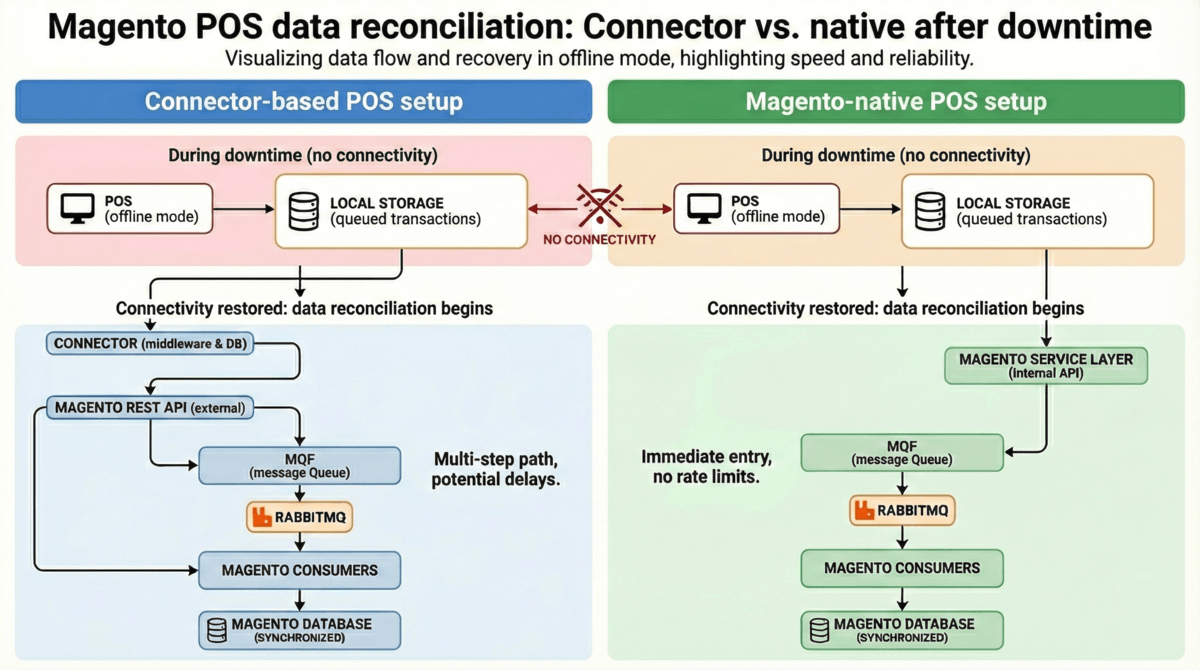
Connector vs native POS: Where they differ
Although both setups ultimately rely on Magento’s internal processing, the path into Magento is very different.
Connector-based integration flow
POS → Connector (middleware) → Magento REST API → MQF → RabbitMQ → Magento consumers
- Data must travel across multiple systems, from the POS frontend, POS application layer, connector middleware service, connector’s database, and finally to Magento’s REST API endpoints, crossing multiple databases and moving entirely over HTTP APIs.
- Mapping, transformation, and deduplication occur in the connector layer.
- API rate limits, network latency, and retry cycles determine how quickly queued transactions reach Magento.
Native POS integration flow
POS (native) → Magento service layer (internal API) → MQF → RabbitMQ → Magento consumers
- The POS runs inside Magento’s application environment.
- There is no external connector, no cross-system translation, and no API rate limiting.
- Data enters MQF immediately once the POS is online.
What Magento and RabbitMQ actually do during recovery
Once data reaches Magento, both architectures rely on the same internal infrastructure:
Magento Message Queue Framework (MQF):
- Handles internal asynchronous tasks, such as order events, inventory reservation updates, invoice events, etc.
- Uses RabbitMQ or MySQL as the message broker
- Consumers process queued events reliably with acknowledgements, retries, and persistence
(Source: Adobe Commerce MQF documentation)
RabbitMQ
Official RabbitMQ benchmarks show that the broker is rarely the bottleneck during post-outage recovery. In RabbitMQ 3.12, quorum-queue backlog tests reached 15,000+ messages/second, even when draining a 5-million-message queue. In RabbitMQ 4.1, sustained publish/consume tests handled 6,000+ messages/second with 20 KB messages under load.
These results demonstrate that a properly configured Magento MQF and RabbitMQ setup can clear typical Magento POS backlogs (usually in the hundreds or low thousands of messages) very quickly.
This means:
- Magento’s internal queues are almost never the performance bottleneck.
- The bottleneck is how quickly each POS setup can deliver its queued orders into Magento.
How reconciliation differs in practice
Connector-based setups
When the Internet returns:
1. The POS sends queued orders to the connector.
2. The connector transforms and maps fields (IDs, timestamps, SKUs, tax rules, payment metadata).
3. Orders are sent to Magento through REST API requests, subject to:
- API rate limits
- Network latency
- Retry cycles
- Schema translation overhead
4. Only after Magento receives the data do MQF and RabbitMQ handle the internal operations.
Risks rise with larger backlogs:
- Duplicates
- Missing orders
- Conflicting SKU states
- Slow clearance due to API throttling
- Version conflicts in MSI inventory reservations
Providers like Maurisource, Zapier, and Alumio offer queueing and retry features, but all remain constrained by API throughput.
Example: Zapier’s official API rate limits
Zapier publicly documents clear rate-limit constraints on its webhook/API activity:
- 20,000 requests per 5 minutes per user
- 1,000 requests per 5 minutes per Zap (legacy webhook routes)
Source: Zapier Help Center: Webhooks by Zapier Rate Limits and Zap Limits
If a merchant starts replaying 300, 600, or 2,000 offline orders after an outage, each order typically requires multiple API calls (e.g., order creation, inventory update, customer sync). That means a backlog easily produces thousands of API calls, which must fit within the connector’s rate-limit window. When rate limits are exceeded, Zapier automatically delays or retries tasks, extending reconciliation time.
What does this mean for recovery after downtime?
Because connector platforms must respect API limits and HTTP network conditions, a backlog that could be processed in seconds inside Magento’s MQF/RabbitMQ may take minutes or tens of minutes to reach Magento through a connector.
In short:
- Connector platforms can queue and retry (e.g., Zapier, Alumio, Maurisource, SkuPlugs).
- But they cannot bypass API throughput limits.
- Therefore, API throughput, not MQF or RabbitMQ, becomes the gating factor in how fast they recover from downtime.
Native Magento POS setups
A native POS:
- Shares Magento’s data model and domain logic
- Syncs directly into Magento’s internal service layer
- Avoids all external API limits or schema translation
When the connection returns:
- Transactions enter Magento almost instantly.
- MQF and RabbitMQ process them quickly because the internal queue speed is rarely the bottleneck.
However:
- Being a Magento-native POS doesn’t mean the POS has automatic offline support.
- Offline mode still requires local caching capability.
Benchmark-based interpretation, from Magestore internal operational data
These benchmarks come from real deployments and help illustrate when each architecture remains practical.
Scenario 1: Small to mid-size retailers
- ≤5,000 SKUs, ≤1,000 daily orders
- 15–30 minutes downtime
Backlog size after outage (example calculation):
- ~10–21 orders at average load
- ~31–63 orders during peak hours
- ~60–380 MQ events inside Magento (assuming 2–6 events per order; this is based on operational patterns since Adobe does not document MQ events per order.)
For this scale:
- Connector-based reconciliation usually completes in seconds to a few minutes.
- API limits are rarely reached.
- RabbitMQ clears internal queues rapidly (far below its tested throughput).
Therefore, connector setups remain suitable and cost-efficient in such scenarios.
Scenario 2: High-volume retailers
- 20,000 SKUs, >5,000 daily orders
- >5 minutes downtime
Even short outages create a significant backlog:
- At 625 orders/hour peak → ~52 offline orders
- At 5,000 orders/hour peak → ~417 offline orders
- → translates to ~834–2,502 MQ events
Here’s the issue:
- RabbitMQ can clear 2,500 messages almost instantly
- but connectors must first replay all orders through REST APIs.
- API throughput becomes the bottleneck.
- Cross-system reconciliation increases collision probability.
- Recovery often takes tens of minutes, sometimes longer during campaigns.
At this volume, native POS becomes more reliable because it avoids external hops and enters Magento immediately.
How different roles assess post-outage impact
- Store owner: Assesses the frequency of outages and their operational impact.
- When order volume is lower (≤1,000 daily orders) and delays are brief (≤15–30 minutes), recovery tends to be manageable for most teams.
- As volumes rise (>5,000 daily orders), the potential business impact of longer recovery windows becomes more noticeable, regardless of integration type.
- IT manager: Focuses on recovery workload, monitoring effort, and points of dependency.
- Connector setups may require checking multiple systems (POS, middleware, Magento) after an outage.
- Native POS setups involve fewer components but still rely on Magento’s APIs and consumer health.
The technical preference depends on internal processes and system complexity.
- Store manager: Cares about how much manual review is needed to reconcile offline sales.
- When backlogs are small (tens of orders), reconciliation is usually quick with either method.
- At higher volumes (hundreds of orders), both setups require more verification, but the number of cross-system checks differs.
- Finance manager: Evaluates the relationship between downtime frequency, reconciliation labor, and overall cost of ownership.
- Workloads under ~5 hours/week generally remain manageable within a connector setup.
- Reconciliation exceeding ~10 hours/week, driven by higher order volume or more frequent outages, may prompt reassessment of long-term integration costs.
Summary
- Offline capability determines whether sales continue during outages.
- The real difference appears after connectivity returns.
- Magento’s MQF and RabbitMQ are rarely bottlenecks thanks to high throughput.
- The bottleneck is the transfer path:
- Connector setups must traverse POS → connector → Magento API → MQF
- Native setups write directly into Magento
- Connectors remain a good fit for smaller retailers.
- Native becomes essential at scale to maintain real-time accuracy and predictable recovery.
4.2 Data accuracy and customer trust
Why it matters
Inventory and pricing consistency determine both operational stability and customer trust. When stock or price data become unsynchronized across channels, retailers face overselling, manual refunds, and customer dissatisfaction.
A Fluent Commerce (2023) survey reported that 38.6% of retailers cancel ≥10% of orders due to inventory inaccuracies, and 58% operate with <80% accuracy, a direct hit to trust and profitability during fast-moving campaigns.
Connector consequence
How connectors sync data:
Most connectors rely on scheduled polling or “near–real-time” job triggers. Public documentation from major connector vendors confirms this pattern:
- Maurisource: List bi-directional Magento API integration capabilities for live inventory sync, but does not disclose sync timing or batching frequency publicly for other information like orders, customers.
(Source: Maurisource connector for Lightspeed and Magento integration) - Zapier’s users have tested and found that the iPaaS syncs data every 9 minutes.
(Source: What is the refresh/sync time of a Zapier Central data source?) - Alumio: Support “real-time data exchange” and “scheduled data jobs”, allowing merchants to choose sync frequency, but does not publish specific interval numbers.
(Source: Alumio’s performance insights for the Alumio iPaaS)
In practice, accuracy depends on:
- How often each connector route runs (continuous, near real-time, or scheduled jobs).
- API rate limits and throughput between POS, connector, and Magento.
- Mapping rules and error handling when data structures differ.
Insights from Magestore’s internal operations:
Magestore’s project data suggests that for up to ~5,000 SKUs, ~1,000 daily orders, peak <200 orders/hour, connector-based integrations can keep Magento and store inventory sufficiently aligned for normal trading, provided weekly reconciliation stays under roughly 5 hours. At this scale, small timing differences between systems rarely become visible to customers and are usually caught in routine checks.
As catalogs and order volumes grow, the same architectural properties that make connectors flexible, separate systems, cross-system mapping, and multiple queues also increase the chance of short-lived but frequent visibility gaps (for example, Magento still showing “1 in stock” briefly after the last item is sold in store). When weekly reconciliation effort rises beyond about 10 hours, Magestore’s internal data shows that connector setups tend to generate recurring stock discrepancies and manual fixes that start to erode customer confidence and internal trust in the data.
In other words, connector-based architectures can support accurate day-to-day inventory for many retailers, but their reliability depends on volume, configuration, and the effort you are willing to invest in monitoring and reconciliation.
Native consequence: accuracy within a single Magento environment
A Magento-native POS runs inside the Magento / Adobe Commerce application, using the same database, APIs, and Inventory Management infrastructure that power the online store. When a sale happens in a native POS:
- The order is created directly in Magento.
- Inventory reservations and salable quantities are updated through Magento’s Inventory Management modules, using the same logic that protects against overselling during web checkout.
- Any asynchronous work (for example, notifications or downstream integrations) is handled via the Message Queue Framework (MQF) and its consumers inside the same environment.
Because there is no external connector layer translating between databases, there is no additional sync step required to bring Magento “up to date” with POS activity. Data accuracy is primarily governed by:
- How reliably the native POS writes transactions into Magento.
- How correctly Magento’s reservation and salable-quantity logic is configured.
- General process discipline (receiving, returns, adjustments).
Magestore’s internal benchmarks indicate that once retailers grow beyond ~20,000 SKUs or ~5,000 daily orders, even small timing gaps or mapping issues in connector-based setups translate into noticeable overselling risk and recurring manual corrections. At this scale, a Magento-native architecture, where all channels share one inventory model and data store, has proven more effective at maintaining accurate, real-time salable stock across stores with less reconciliation effort.
This does not mean a native POS automatically guarantees perfect accuracy: stores still need disciplined inventory procedures, and Magento itself must be correctly configured. But it removes an entire category of technical inconsistency caused by cross-system sync.
How different roles interpret data accuracy vs. architecture:
- Store owner: Evaluates how often stock mismatches lead to refunds, lost sales, or customer complaints.
- Connectors remain acceptable while incidents are rare and weekly manual checks stay modest.
- As the business grows and errors become visible to customers, or reconciliation consumes a meaningful share of staff time, a native approach becomes easier to justify.
- IT manager: Focuses on where discrepancies originate and how many systems must be checked when something is wrong.
- With connectors, data may diverge in the POS, connector, or Magento.
- Native POS centralizes most logic in Magento, simplifying monitoring and incident analysis.
- Store manager: Needs confidence that on-screen stock and prices match reality. Occasional small lags are tolerable at low volume, but if staff must constantly double-check availability, it is a sign that the current sync model is struggling at the retailer’s scale.
- Finance: Sees the cumulative impact: time spent on investigations, adjustments, and refunds, and the revenue impact of cancelled or delayed orders.
- When these costs stay low, connector-based setups remain cost-effective.
- When they rise steadily with volume, a Magento-native POS can reduce long-term operational and reputational risk, even if the initial investment is higher.
In summary, under the data accuracy and customer trust lens, connector-based integrations are often “good enough” at a lower scale when supported by disciplined reconciliation. As catalogs and order volumes increase, the compounding effect of cross-system sync makes a Magento-native POS increasingly valuable for keeping Magento’s salable quantities aligned with real-world stock and sustaining customer trust over time.
Many Magento merchants who use Maurisource to connect Vend (Lightspeed) POS with Magento have experienced stock inconsistencies. Keep on reading to see why and how to resolve.
Vend (Lightspeed) and Magento: Why stock sync breaks and how a Magento-native POS fixes it.
4.3 Scalability and future readiness
Why it matters
As retailers expand, whether adding more stores, launching omnichannel operations, or increasing SKU breadth, their POS–Magento integration must scale without introducing sync delays, data drift, or operational bottlenecks.
Scalability goes beyond raw transaction volume. Each year, Adobe Commerce releases multiple versions and security patches that adjust APIs, indexing behavior, inventory logic (MSI), and extension compatibility. The more systems a retailer integrates with Magento, the more coordination, testing, and validation they must perform during every upgrade.
A scalable integration is therefore one that:
- handles rising SKU and order volumes predictably,
- maintains real-time visibility across all locations, and
- stays maintainable as Magento evolves.
Connector consequence

Connectors scale well within moderate retail ranges, based on Magestore’s internal implementation data:
≤10,000 SKUs, ≤1,000 daily orders, and up to ~3 physical stores.
At this scale, sync workloads remain small enough that API-based updates, field mapping, and error resolution stay predictable.
Beyond this range, scalability challenges emerge, not because connectors are poorly built, but because cross-system architectures multiply dependencies:
1. More locations = more sync points
Each store introduces additional MSI sources to map, monitor, and reconcile. With three independent systems involved (POS ↔ Connector ↔ Magento), conflicts or delays become more visible when the store count increases.
Additional complexity arises when the POS maintains its own inventory management system instead of using Magento as the single source of truth, such as when Lightspeed is the master catalog and Magento is the slave catalog.
In these cases, the connector must translate stock levels, reservations, and adjustments between two independent inventory engines. As store count increases, this multiplies the number of SKU-location combinations that must be kept aligned and increases the risk of temporary discrepancies during peak load, batch updates, or API delays. This makes scalability more sensitive to connector performance and workload, particularly in multi-store or high-turnover environments.
2. More data volume = more mapping and error-handling
As SKU and order volume rise, each update must pass through:
POS system → connector job queue → connector transformations → Magento API → Magento’s internal processing.
Higher throughput means more chances for schema mismatches, throttling events, or retry cycles.
3. Version compatibility becomes harder to maintain
Connectors depend on Magento’s API, so when Magento changes API behavior, index structure, or MSI logic, connector providers must update their integration layer. This introduces risk during Magento upgrades, especially when:
- Merchants stay on very old Magento versions.
- A connector must support multiple merchant versions simultaneously.
- API changes by the POS vendor break compatibility.
As the footprint expands, maintaining version compatibility also becomes harder. Every Magento upgrade demands that connector providers test and update their extensions.
Internal case example:
A large retailer on Magento 2.3.x experienced a full sync outage after their POS vendor updated its API to align with Magento 2.4.x. Because the connector could not maintain backward compatibility, the merchant spent 7–10 days entering orders manually while waiting for a patch, resulting in severe stock discrepancies.
This illustrates a systemic constraint: A single API change by either system can disrupt all merchants using that connector, and patches must be developed and tested for every supported version.
When growth accelerates faster than connector capacity, or when merchants rely on older Magento versions, maintenance workload increases sharply.
Native consequence

A Magento-native POS scales with Magento by design. All operations occur within one system boundary, so new stores, higher SKU counts, or more transactions inherit Magento’s existing:
- MSI source structure
- indexing logic
- database model
- queue processing (MQF + RabbitMQ)
- API conventions
1. More stores without more interfaces
Opening new locations does not add new system layers; all stores share the same data model. This avoids the exponential growth of mapping rules found in connector setups.
2. Upgrades follow Magento’s cadence
Because a native POS is versioned alongside Magento, upgrades occur in a single unified workflow, instead of across multiple vendors. A real-world Magento 2.3 → 2.4 migration from Codilar required roughly 6 weeks of testing and extension rewrites, illustrating the complexity of cross-system maintenance.
3. Predictable scaling at higher volume
Internal benchmarks show that a native POS remains stable well above the connector comfort range (>10,000 SKUs, >1,000 daily orders, >3 stores). Real-time stock visibility is preserved even when catalogs exceed 20,000 SKUs or orders reach several thousand per day, because all updates remain inside Magento’s environment without cross-system dependencies.
Why it matters across roles
- Store owner: Ensures that system growth won’t force a re-platform later.
- Connectors work well for steady, controlled expansion.
- Native architectures offer long-term headroom when store count or SKU complexity rises.
- IT manager: Considers version control and failure surface area.
- Connectors require compatibility across POS vendors, connector vendors, and Magento.
- Native setups reduce these touchpoints and keep upgrade control in-house.
- Store manager: Needs consistent workflows across all locations.
- Native POS ensures real-time alignment across branches.
- Connector sync delays become more visible as more stores share inventory.
- Finance: Evaluates the total cost of ownership.
- Connectors minimize early capital expenditure but introduce recurring operating expenditure for troubleshooting, upgrade coordination, and dependency maintenance.
- Native POS has a higher initial cost but provides more predictable long-term scaling.
Summary
- Connectors scale reliably up to moderate complexity (≤10,000 SKUs, ≤1,000 daily orders, ~3 stores).
- Beyond this range, cross-system dependencies, API changes, and multi-vendor version alignment create rising maintenance overhead and outage risk.
- Native POS scales with Magento, supporting larger catalogs, more stores, and faster upgrades with fewer compatibility issues.
After establishing scalability, the next question is whether the integration can grow sustainably from a cost and resource standpoint, which is explored in Section 4.5.
Case study: Mr. Pet’s, a Canadian pet store with 10 locations, 8,000 product SKUs, and 1,200–1,800 orders per day switched from the connector-based Microsoft Dynamics to a Magento-native POS for accurate and real-time data sync.
4.4 Cost predictability and maintainability
Why it matters
The cost of a POS Magento integration extends far beyond the software license. Labor hours, upgrade coordination, hardware compatibility, and reconciliation time all shape the true Total Cost of Ownership (TCO).
When these indirect costs fluctuate, financial planning becomes uncertain and ROI harder to measure.
Therefore, budgeting involves balancing short-term affordability with long-term cost stability. Predictable expenditure supports growth initiatives and cash-flow control, while hidden or erratic expenses, such as patching or version retesting, can quietly erode margins over time.
Connector consequence
Connectors typically offer a lower upfront cost, making them attractive for small or steadily growing retailers. Subscription fees range from ~$20/month to $300–500/month (e.g., Zapier Professional Plan) or higher, depending on task volume, data frequency, and support tier. However, connectors add cost drivers beyond licensing:
1. Reconciliation labor (based on internal benchmarks)
Magestore’s internal data shows:
- Connector remains sufficient: when reconciliation stays under 5 hours/week.
- Native becomes necessary: when reconciliation regularly exceeds 10 hours/week, especially during peak seasons or after upgrades.
Reconciliation is normally performed by store or operations staff, not accountants, so labor is tied to staff’s hourly wage.
Example:
In the U.S., a store associate fixes 10 hours of mismatches per week at $15/hour → ~$7,800/year in hidden operating costs.
This often equals or exceeds a connector’s annual subscription.
Source: Retail Salary: Hourly Rate December 2025
2. Upgrade and compatibility work
Connectors depend on both Magento’s API and the POS vendor’s API. When either system changes:
- The connector must issue patches
- Merchants must retest mappings, jobs, and workflows
- Version drift increases maintenance risk
A real-world Magento 2.3 → 2.4 migration documented by Codilar required ~6 weeks of extension rewrites and QA, illustrating how cross-system maintenance can outweigh initial setup effort.
3. Hardware and vendor dependencies
Changes in POS firmware, device drivers, or SDKs can break workflows, requiring additional QA and sometimes vendor intervention.
4. Budget volatility
Connector-based operations typically run smoothly in stable periods. But major version changes, POS updates, schema adjustments, or API deprecations can trigger multi-week bursts of reactive work. This unpredictability makes long-term budgeting harder.
When connectors remain cost-efficient:
- Low-to-moderate order volume (Magestore’s internal benchmarks: Catalog ≤ 5,000 SKUs, ≤ 1,000 daily orders)
- Stable environments (few upgrades, modest catalog changes)
- Reconciliation consistently <5 hours/week
- Vendors issue timely patches
When cost becomes unpredictable:
- Frequent API or version changes
- Reconciliation >10 hours/week
- Multi-store environments with higher sync complexity (Magestore’s internal benchmarks: Catalog > 20,000 SKUs, > 5,000 daily orders)
Native consequence
A Magento-native POS operates within Magento’s own environment, aligning maintenance and cost cycles.
1. Unified upgrade path
Because the POS and Magento share the same data model and API framework, upgrades occur in a single workflow rather than across multiple vendors.
Major version updates typically complete within the 6-week window documented in Magento 2.3 → 2.4 migrations, but the key advantage is predictability: merchants control the entire upgrade timeline internally.
2. Reduced cross-system maintenance
There is no need to retest mapping rules, API endpoints, or data-translation logic. Reconciliation workload drops significantly because stock and order updates do not pass through external systems.
3. Stable cost curve
Native setups offer more predictable maintenance because all updates, compatibility checks, and troubleshooting occur within Magento itself, without relying on external POS or connector vendors. This consolidated maintenance scope reduces the risk of version misalignment or API breakages, which are common sources of unexpected operating costs in connector-based setups. This produces predictable OpEx year-over-year and clearer long-term ROI.
In short:
- Connectors lower upfront cost but introduce variable operating expenses.
- Native systems require higher CapEx but deliver more stable long-term cost predictability.
Why it matters across roles
- Owner: Seeks predictable operating cost.
- Connectors work when maintenance is light.
- Native becomes safer as the business grows and version-alignment work increases.
- IT manager: Manages version control and technical debt.
- Connectors amplify cross-vendor dependencies.
- Native POS consolidates maintenance within Magento.
- Store manager: Cares about daily stability. Native POS reduces unplanned downtime and the need for staff to manually fix mismatches.
- Finance: Optimizes long-term ROI.
- Connectors distribute cost but introduce variability due to upgrades and reconciliation.
- Native solutions require a higher initial investment but produce stable, predictable OpEx.
After cost predictability, another long-term factor is how closely your POS architecture aligns with Magento’s own ecosystem. Alignment determines not only upgrade smoothness but also how future-proof and secure your integration remains.
4.5 Integration alignment with the Magento ecosystem
Why it matters
Beyond cost and maintenance, the long-term stability of any Magento POS integration depends on how closely the POS aligns with Magento’s architecture, API conventions, and release cadence. Each Magento upgrade introduces adjustments to APIs, indexing, security patches, and data structures. A POS that integrates tightly with Magento’s patterns allows merchants to adopt new versions faster and maintain platform compliance with less risk.
A loosely coupled architecture, by contrast, spreads upgrade responsibility across several vendors. This increases dependency risk, delays access to new features, and amplifies technical debt over time.
Connector consequence
Connectors bridge two independent systems and must stay compatible with both Magento and the POS vendor. Because each system evolves on its own schedule, version control becomes a multi-party coordination task.
When Magento releases a new version, connector providers typically need to:
- review API or schema changes
- adapt and re-test their middleware
- release a compatibility update for merchants to validate across all affected extensions.
Meanwhile, POS vendors may publish their own API updates, meaning a connector must maintain compatibility in two directions at the same time. If either side changes behavior unexpectedly, sync may pause until a patch is released.
When working with Magento merchants, we’ve seen that many of them postpone Magento upgrades until connector compatibility is confirmed, while others upgrade first and temporarily disable synchronization. This flexibility can be useful for retailers running multiple POS platforms, but it also means slower adoption of Magento innovations, a heavier QA burden, and higher coordination overhead during every major update.
Native consequence
A Magento-native POS is built as a Magento module, using Adobe Commerce’s official APIs, service contracts, and database schema. All operations run within Magento’s environment, which reduces external integration points and eliminates cross-vendor alignment.
While the POS vendor still validates the module for compatibility with each new Magento release, the update process is confined to one system boundary, not several. This reduces the surface area for version mismatches and shortens recovery time after upgrades.
Because the POS and Magento follow compatible architectural patterns, merchants benefit from:
- consistent data handling
- fewer upgrade-related errors
- clearer testing workflows
- faster adoption of new Magento features or security updates.
This tight alignment trades some flexibility (e.g., multi-platform interoperability) for predictability and long-term stability.
Why it matters across roles
- Owner: Gains confidence that system updates will not disrupt operations. Accepts reduced flexibility in exchange for smoother upgrade cycles.
- IT manager: Prefers a single-platform test cycle. A connector adds vendor-coordination risk; a native POS keeps upgrade control in-house.
- Store manager: Experiences fewer interruptions from version mismatches and more predictable upgrade timelines.
- Finance: Views alignment as risk reduction. Fewer unexpected delays translate into steadier operations and lower contingency spending.
Further reading: Goodbye double entry: Migrating from QuickBooks POS to a Magento-native POS (No connector needed). This article demonstrates how removing cross-system connectors eliminates recurring reconciliation and version-alignment costs, illustrating the same cost-predictability principles discussed in this section.
An integration between POS and Magento isn’t only a technical choice, it’s a long-term investment in operational capability, customer experience, and organizational readiness. The right model should not only reduce work today but continue to create value as the business grows.
4.6 ROI horizon and strategic fit
Why it matters
Return on investment (ROI) depends on more than software cost. It reflects:
- How much manual intervention is eliminated
- How reliably systems stay in sync
- How expensive upgrades and version alignment become
- How well the architecture supports long-term scaling
Different integration models create value on different timelines: connectors provide rapid activation, while native architectures compound value over longer operational cycles.
Connector consequence
Connectors deliver fast, early ROI because they are quick to deploy, require minimal development work, and immediately reduce manual data entry. This makes them ideal for:
- launching online sales alongside an existing POS
- testing new store concepts
- early-stage or steady-state operations with predictable complexity
However, as the business grows in SKU count, store count, and systems involved, ROI gains begin to flatten. This is not due to poor design but due to structural constraints:
- Each additional store increases sync points.
- Multi-vendor version alignment introduces unpredictable maintenance effort.
- Reconciliation workload grows with transaction volume.
- Vendor updates (Magento, POS, connector) must be coordinated across systems.
These increasing operational overheads gradually reduce the incremental ROI connectors provide.
Strategic interpretation: Connectors maximize value when the goal is speed, experimentation, and early efficiency, not long-term consolidation or large-scale infrastructure growth.
Native consequence
A Magento-native POS behaves more like a long-term operational infrastructure investment.
It requires more planning upfront, but the value compounds over time because:
Data, workflows, and upgrades remain inside one system boundary.
Version changes follow a single Magento-aligned testing cycle.
Multi-store, multi-channel expansion does not multiply system interfaces.
Reconciliation workload drops significantly because cross-system mismatches are removed.
Instead of hitting a ceiling, native architectures tend to accumulate efficiency as order volume, locations, and catalogs grow.
Strategic interpretation: Native POS systems create increasing returns over longer horizons by reducing technical debt, minimizing sync failures, and avoiding future connector rebuilds or re-platforming.
Why it matters across roles
- Store owner: Chooses between fast activation (connector) and long-term operational leverage (native). Connectors enable quick wins; native systems sustain efficiency as the business scales.
- IT manager: Evaluates long-term technical debt.
- Connectors multiply vendors and release cycles.
- Native POS consolidates testing and reduces failure surfaces.
- Finance: Focuses on predictability, not just short-term savings.
- Connectors distribute cost gradually but introduce variability from reconciliation, troubleshooting, and upgrade cycles.
- Native POS centralizes maintenance into one environment, giving finance teams more stable operational expenditure.
- Store manager: Experiences ROI through daily operations: fewer sync issues, fewer manual corrections, and more consistent stock accuracy.
Summary
- Connectors maximize short-term ROI through speed and flexibility, but experience diminishing returns as cross-system complexity grows.
- Native POS delivers compounding ROI by eliminating inter-system dependencies, reducing reconciliation and upgrade effort, and aligning fully with Magento’s evolution.
5. Key takeaway: When a connector holds and when a native POS is required
Decision driver | Connector is good enough when… | Native POS still covers use cases of connectors, but is more suitable when… |
Downtime during peak periods | Peak traffic < 200 orders/hour, short sync failures < 10 min tolerated | Traffic ≥ 500 orders/hour, or 5 min downtime during major events (e.g., Black Friday) causes measurable revenue loss. |
Data accuracy and synchronization | Catalog ≤ 5,000 SKUs, ≤ 1,000 daily orders, sync 15–30 min, discrepancies < 0.5% | Catalog > 20,000 SKUs, > 5,000 daily orders, or multi-store setup, sync delay > 5 min → overselling or stockouts |
Scalability under growth | ≤ 3 stores, < 10,000 SKUs, ~ 1,000 daily orders, SKU changes infrequent | > 5 stores, > 20,000 SKUs, > 5,000 daily orders, frequent SKU changes, multi-channel (web + store + marketplace) |
Hidden/indirect costs | Total weekly reconciliation workload ≤ 5h/week, ≤ 2 monthly support tickets, connector remains stable through minor upgrades | Total weekly reconciliation workload > 10h/week, emergency fixes ≥ 1/week, Magento upgrades frequently disrupt integration |
Integration maintainability | Compatible with current Magento version, requires patching 1–2/year |
|
Customer trust impact | Errors are rare and isolated. | Recurring errors affect order accuracy and customer trust. |
Budget predictability and ROI horizon | Lower upfront cost, ROI expected within months | Lower upfront cost, ROI expected within months |
Operational usability and staff efficiency | Staff can manage occasional manual sync or checkout fixes. | Frequent disruptions reduce checkout speed and staff efficiency. |
Merchant examples | Boutique (1 store, 5,000 SKUs, 100 orders/day) stable on connector |
|
Conclusion
Both connector-based and Magento-native POS systems can support Magento retailers effectively. The right choice depends on business scale, system complexity, and long-term priorities.
- A connector remains practical when operations are simple, and agility matters most.
- As order volume, store count, and data dependencies grow, a Magento-native POS becomes a more stable and predictable foundation for sustained growth.
By applying the evaluation framework in Section 1, you can make an evidence-based decision that balances short-term efficiency with long-term reliability and ensures your POS Magento integration evolves in step with your business strategy.
With more than 15 years of experience working closely with Magento merchants, Magestore provides a fully Magento-native POS built as part of the Magento ecosystem. If you’d like tailored advice on whether a connector or a native approach is better for your specific workflows, our solution consultants can help you evaluate your case based on the criteria outlined in this guide.