





Not every Magento POS system can keep selling when the internet goes down. Only Magento 2 POS solutions with a true offline mode can keep the register running during an outage by caching every transaction on the device and retrying the sync with Magento at a regular interval (e.g., every 60 seconds) until the server confirms receipt.
This means the register stays usable even when the network drops. However, only specific features work safely offline. Some tasks, like payment authorization, MSI stock reservations, and reporting, still depend on those queued transactions successfully syncing back to the server.
If the connection returns quickly, the system catches up smoothly by replaying all queued transactions in order. If the sync is delayed or fails, the store may see temporary discrepancies in stock, payments, or order history until reconciliation completes.
Read on to understand what Magento POS truly keeps working offline, and where operational or financial risks can still appear.
Key takeaways
- Magento POS offline mode keeps stores selling during network outages by caching all transactions locally and retrying sync until Magento confirms each one.
- Offline mode uses a local snapshot of products, customers, pricing, and stock, which allows normal checkout but not live Multi-Source Inventory (MSI) accuracy.
- Offline payments are provisional because authorization happens only after the terminal reconnects.
- Reliable offline performance depends on device storage, a healthy retry loop, and post-outage checks.
- Fewer layers mean fewer failure points. A Magento-native POS with offline mode lowers the risk of missing orders during syncing because it stores data locally and sends it straight to Magento without a middle layer.
What offline mode actually preserves when the network drops
Some Magento POS solutions offer an offline mode that lets you continue checkout even without an internet connection. Each POS has its own mechanism to operate in offline mode.
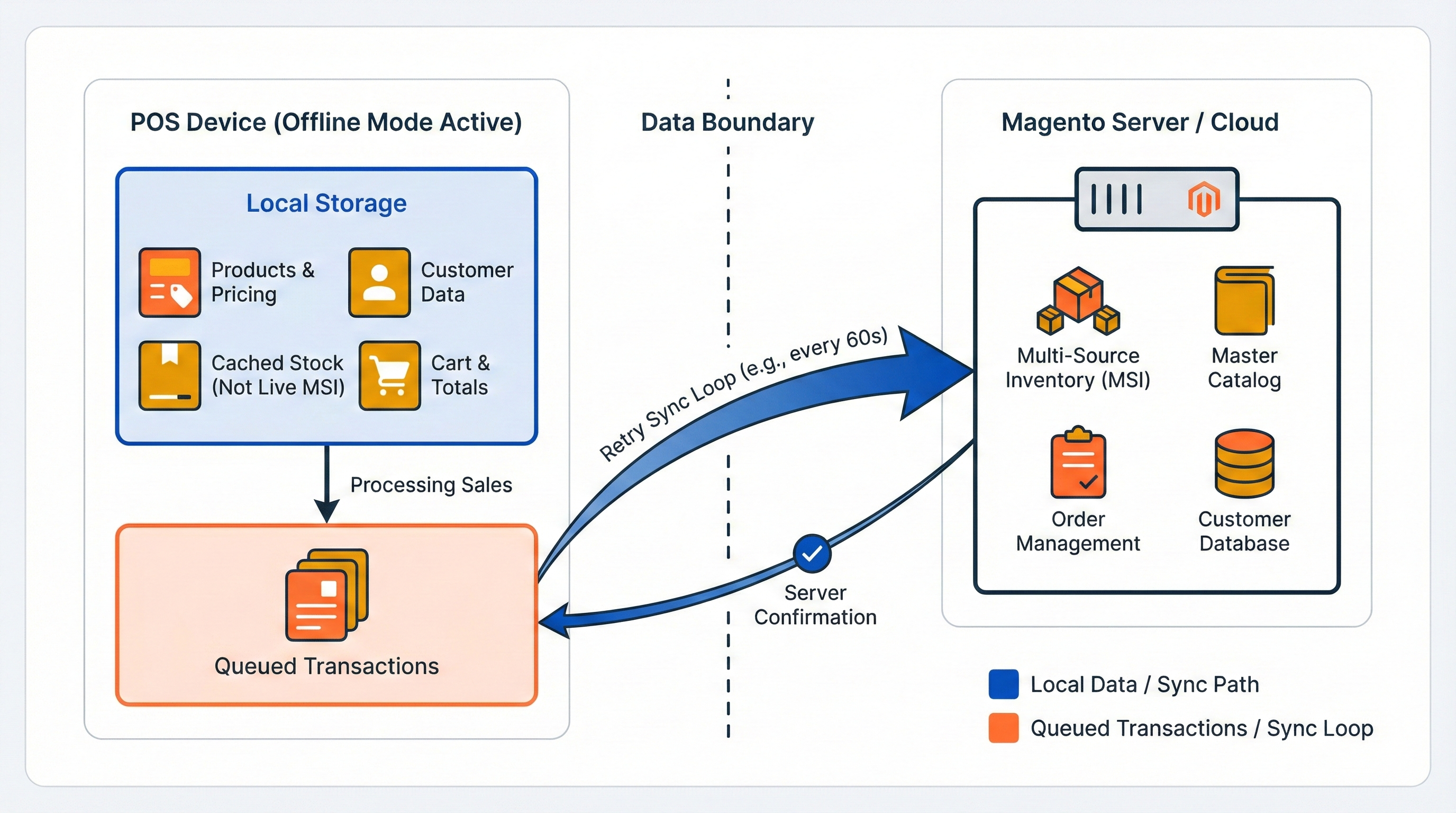
Take Magestore POS, a Magento-native POS, as an example. You can sync data to the device before opening the store and then operate fully offline. During an outage, the POS switches to local data and keeps processing sales. It then retries syncing with Magento at set intervals (for example, around 60 seconds) until the server confirms each transaction. This helps ensure the selling floor stays active even when the network is unstable.
For a simpler explanation: when in offline mode, the system operates from a local snapshot of products, customers, pricing, and stock, allowing it to continue processing sales. Because all of this data sits on the device, the POS can still calculate totals, apply discounts, and complete orders without online access. The checkout flows normally, but the POS uses cached stock rather than live Multi-Source Inventory (MSI).
One of the main constraints of offline mode is the device’s storage capacity. As your catalog grows, the offline dataset grows with it, increasing both storage requirements and sync workload. For this reason, it’s important to evaluate whether your devices have enough storage before relying on offline mode.
However, staying operational is only half the equation, you also need to know how orders return to Magento.
How offline orders sync back into Magento and affect inventory & reporting
Offline orders only become “real” Magento orders after the POS successfully syncs them back to the server. Until Magento confirms receipt, none of the platform’s core processes – MSI updates, or reporting – can run. Therefore, successful syncing is crucial.
Offline order storage
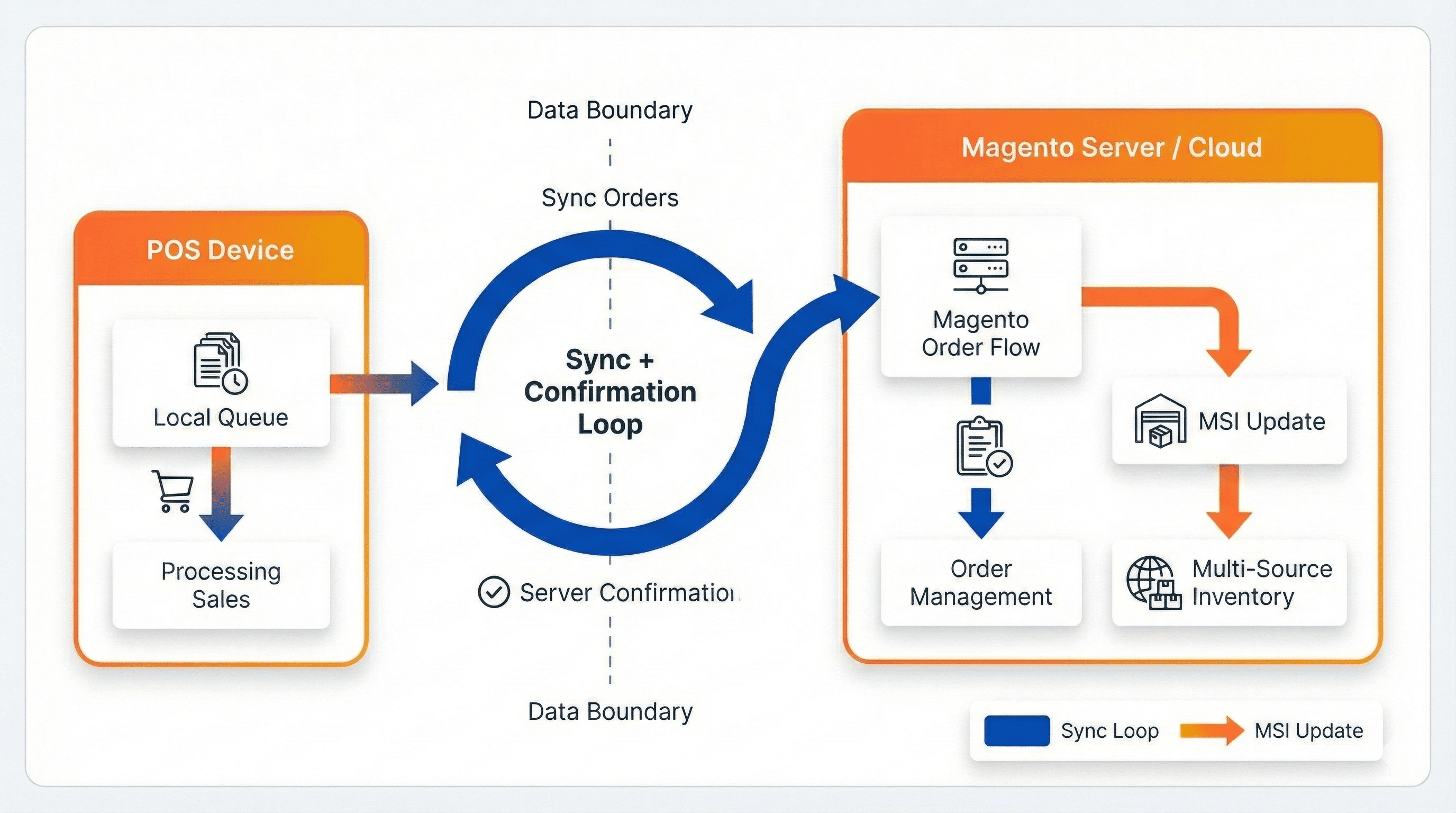
The Magento POS stores all offline orders in a local queue on the device. When the internet connection drops, the POS continues to process sales normally and places each completed transaction into a queue. As soon as the connection is restored, the POS automatically resumes syncing, sending each order to Magento and waiting for Magento to confirm receipt and recording.
This confirmation step is essential. Only after Magento accepts the order does it enter Magento’s order flow and update inventory accurately. Until that happens, the order exists only on the device, not in Magento.
MSI updates after order sync
Magento’s MSI engine updates salable quantity only when an order enters Magento’s order flow. Because the POS cannot modify MSI directly, it must wait for the sync to complete. Once Magento receives the order, it triggers the normal MSI reservation process and updates the source-item quantities. If the order is still in the local queue, MSI continues to show pre-outage stock, which may not reflect what was sold offline.
Data divergence when sync fails
In some setups, offline sales can be lost during syncing because the order data must pass through several systems before it reaches Magento. For example, with a standalone POS that connects to Magento through a connector, the data has to travel through that middle layer, creating more opportunities for delays, failures, or missing orders.
A Magento-native POS avoids these extra steps. Because it sends orders directly into Magento without passing through multiple systems, there are fewer points of failure. This reduces the chances of orders getting stuck, lost, or duplicated, and leads to more reliable inventory and reporting accuracy.
If the sync fails permanently, or only part of an order makes it through, Magento and the POS begin to drift apart. Magento will show stock levels, order totals, and reports that exclude the offline sales, while the POS will display those sales as already completed. Only manual reconciliation can close this gap. This risk increases when large queues build up during long outages or when sync attempts encounter server errors.
Inventory accuracy depends entirely on whether queued orders successfully sync and are confirmed. Reporting may also lag until Magento receives and processes every offline order.
Even when the order syncs correctly, payment status introduces a second category of offline risk.
How payments, declines, and chargebacks behave for offline orders
Card payments taken during an outage follow a different path from normal online transactions.
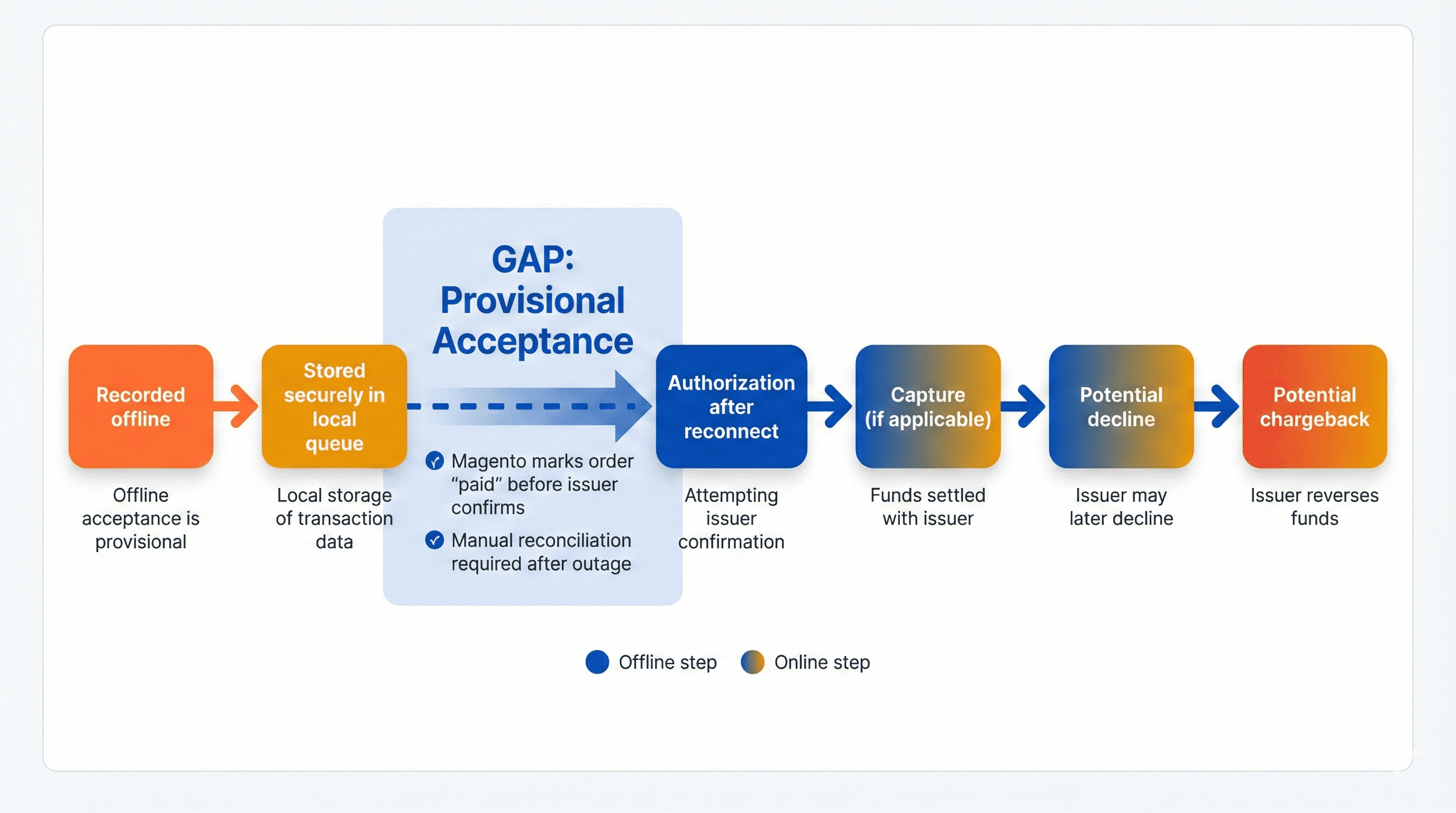
In a typical offline or “store-and-forward” setup, the Magento POS can record the sale on the device, but the actual authorization — the moment the issuer decides whether the card can be charged — only happens after connectivity is restored and the terminal forwards the queued transactions.
Because some of those delayed authorizations can be declined, every offline window introduces a separate layer of financial risk that you have to reconcile and manage once you’re back online.
Payment authorization delay during internet outage
When the POS is offline, an integrated payment terminal can still show a card as “accepted,” but that acceptance is provisional.
In a typical offline or “store-and-forward” setup, the terminal securely stores the encrypted card details and queues the transaction until it can reconnect. Only then does it send the payment to the acquirer for real authorization (and, if applicable, capture). Until that online authorization succeeds, the terminal has no definitive approval — the payment is just a queued transaction with an unknown final status.
That’s why offline card acceptance can’t fully guarantee that every queued transaction will ultimately settle successfully.
Offline acceptance policies
Each provider handles offline acceptance differently, but the mechanism is consistent across major platforms.
Worldpay keeps transactions in a secure offline folder and checks every few minutes to upload them once back online (Source: Worldpay – Offline stand-in).
Adyen stores payment intent and card details locally, then completes the authorization workflow after reconnection (Source: Adyen – Offline payments).
Square uses a similar local-storage model, enabling sales to continue but delaying the decision from the card network (Source: Process offline payments with Square).
All three systems emphasize that offline acceptance is provisional and treated as a best-effort continuation of service – not a confirmed payment.
Decline/chargeback divergence
Because the POS cannot receive live authorization, the cashier has to mark an order as “paid” on the Magento POS system even though the card issuer later declines the transaction. Magento will show the order as completed and paid, while the acquirer may reject or reverse the funds after the fact.
This divergence requires manual investigation. A decline or chargeback that arrives hours after the outage means the business must find the original order, verify payment records, and adjust Magento accordingly. The longer the offline window and the larger the transaction volume, the more reconciliation work the team must handle.
You therefore accept a real, if manageable, risk when processing offline card payments. Post-authorization declines are possible, and you must reconcile payment data after each outage to ensure Magento reflects the true settlement status. A Magento-native offline mode reduces complexity by keeping all order data in one system of record, but it does not remove the need for post-outage payment checks.
Practical checklists for using Magento POS in offline mode
Taking these steps ensures the store exits offline mode with accurate stock, complete reporting, and correctly settled payments:
- Confirm the offline dataset size fits the device capacity
- Verify the retry loop is functioning on all registers
- Reconcile offline payments against acquiring bank reports after outages
- Review Magento for any unsynced or partially synced offline orders and confirm MSI reservations are updated correctly after each sync
- Document manual reconciliation paths for edge cases
Conclusion
Magento POS keeps the checkout running during outages, but the real test comes when the connection returns. Orders must sync, payments must authorize, and Multi-Source Inventory (MSI) must update before Magento reflects what happened on the selling floor. Until those steps complete, stock, reports, and payment records may lag behind.
Reliable recovery depends on device storage, a healthy retry process, and clean reconciliation after each offline window. Because a Magento-native POS writes directly into Magento’s order and MSI layers, it avoids the multi-system drift common with connector-based POS setups and reduces the risk of lost or duplicated orders.
If you want a deeper technical explanation of Magento-native offline reliability or need further support, reach out to our Magento POS experts.
FAQs
1. Does having an offline mode in a POS guarantee accurate inventory?
No. Inventory accuracy depends on Magento receiving the order and updating Multi-Source Inventory (MSI). Offline orders stay in the device’s local queue until the POS can sync them back to Magento. MSI reservations and source-item quantities only update after the sync completes.
If the sync fails, either fully or partially, Magento stock, reporting, and POS history diverge until staff manually reconcile the data.
2. Do offline-capable payment providers guarantee that all offline transactions will be authorized?
No. Payment providers treat offline acceptance as provisional. Platforms like Worldpay, Adyen, and Square store encrypted payment details locally and complete authorization only after reconnecting.
If the issuer later declines or reverses the payment, Magento may still show the order as “paid,” creating a mismatch that must be corrected manually. Offline acceptance does not eliminate decline or chargeback risk.
3. What happens if the device runs out of storage during an outage?
When the device’s local database reaches capacity, the POS can no longer store the offline dataset (products, customers, pricing, and stock) it relies on. Because offline mode depends on this local copy to process orders, any missing or incomplete data prevents the system from functioning correctly. Items may not appear at checkout, pricing may be unavailable, or stock quantities may not load.
4. Can device-specific issues affect offline data?
Yes. Offline mode stores all working data directly on the device. Because the POS depends entirely on this local copy when the network is down, any device-specific issue, such as file corruption, hardware failure, or storage errors, can disrupt the dataset the POS needs to process orders.